If you’re looking for a Google Bard App Script for Google Sheets we have it here:
Google Bard App Script for Google Sheets
function BARD(prompt) {

varapiKey = "INSERT YOUR API KEY HERE";

varapiUrl = "https://generativelanguage.googleapis.com/v1beta2/models/text-bison-001:generateText";

var url = apiUrl + "?key=" + apiKey;

var headers = {

"Content-Type": "application/json"

};

var requestBody = {

"prompt": {

"text": prompt

}

};var options = {

"method": "POST",

"headers": headers,

"payload": JSON.stringify(requestBody)

};

var response = UrlFetchApp.fetch(url, options);

var data = JSON.parse(response.getContentText());

var output = data.candidates[0].output;

return output;}
Just insert your API key where specified.
Where Do I Get My API?
Get your Bard API from MakerSuite.
Using the Script
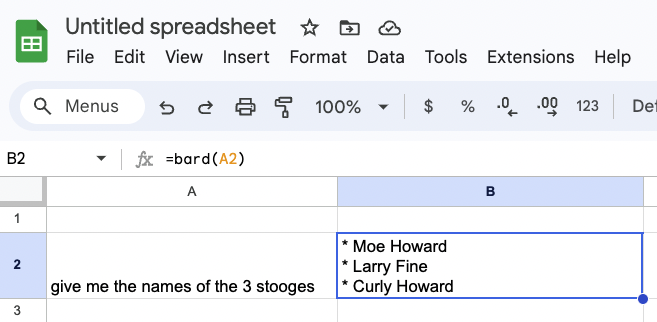
Then you’ll be able to answer questions directly in Google Sheets, such as who the three stooges are:

The prompt for getting it to work is:
=bard(cell_name)
So, if the prompt is in A2, then it’s =bard(A2)