Have you ever faced the problem of a missing or deleted partition during a Windows update or a system crash, and don’t know what to do? I can understand the panic because these things happen when least expected and almost at critical times. However, instead of panicking (which most of us do in such times!), we can use effective hacks to recover the lost or deleted partition after a Windows update or crash.
Well, there is no certain guarantee of recovery because it depends on how much partition is lost or what you have done after losing the partition. There are times when we don’t even realise that the partition has been lost and work on it. That’s where your chances of recovering the data on the partition lessen. Anyway, if you try hacks strategically, you can recover the partition even after the Windows crash. Let’s explore the options here!
Table of Contents
What Is a Partition Loss And Why Does The Happen?
Many people get confused with partition loss, and this is where they do technical things to recover, which further lessen the recovery chances. By “partition” we mean different sections of a computer hard drive. It is like a storage container that contains different files. So, partitions are really important as they contain personal files, extra files, and whatever you store on your hard drive.
Sometimes, these partitions get affected during Windows updates or when your system crashes due to a malware attack. There is a risk of losing it temporarily to permanent deletion, and thus, you won’t be able to find it anywhere unless you do something!
Check For The Actual Partition Loss Using Windows Disk Management
Before indulging in technical hacks, users need to know whether they have actually lost a partition or not. They often mistake the disappearance of the partition as a permanent loss. If your partition is simply hiding behind because of a drive letter glitch, you won’t have to perform recovery hacks. You can check for your partition in simple steps-
- On your screen, go to the Start tab and click the right button. Choose the Disk Management tab. It will redirect you to another tab. Now, check for the missing partition.
- If it is not showing, then the drive letter is missing. Now, you need to assign one. Click right on the partition option.
- Tap on the Change Drive Letter and Paths option.
- Tap on the Add button.
- Click on the Assign tab.
- Now, select a drive letter from the dropdown menu and tap on the OK button.
- Open the File Explorer tab and check for it. If it were simply hiding, you would be able to see it. If not, you need to follow the recovery hacks.
How to Recover a Lost or Deleted Partition
There are no such direct steps or a system to recover a lost partition. So, you will have to rely upon a recovery tool. Though you can find several partition loss recovery tools online, the success rate is a bit low because such tools are not only complex but also have multiple steps. However, the good news is that you can still recover your lost partition and data. So, with a little effort and some YouTube tutorials, you will be sorted.
Method 1: Use A Free Partition Recovery Tool
Yeah, a free tool! When you search online for free partition recovery tools, you will get multiple options, claiming to be the best free tool. Well, some of them might work pretty well, but because of my experience during such an incident, I can’t say the same for every tool. There is no guarantee that free tools will surely recover the lost partition.
Sometimes, the tool works well for you and at another time, the very same tool won’t work at all. These free tools don’t have much credibility, and sometimes you might end up installing malware in the guise of a partition recovery tool. So, I would suggest you avoid using a free partition recovery tool until you are sure enough about anyone or have a most-recommended suggestion.
Before downloading a free tool, make sure you have done thorough research online to avoid any major risks. I hope you won’t like ending up in another problem at the same time! In case you find a good free tool, there are high chances that you might get confused with the complete recovery process or fail to understand step-by-step execution. In any case, you need professional help or online guidance.
Method 2: Use A Paid Partition Recovery Tool
I have done this and trust me, it worked! After all, paid tools are not just reliable but cost-effective in the long run. I have used the paid version of Stellar Data Recovery Software to recover partition. It didn’t only have straightforward steps but was quite effective in restoring data. In case you want to use it, here are the steps-
Step 1: Download, install, and launch the Stellar Data Recovery Professional software.
Step 2: On the main screen, select All Data and click Next.
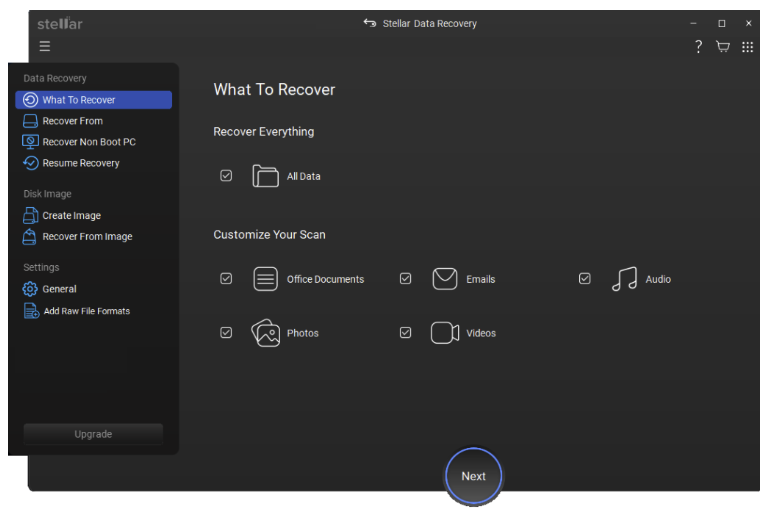
Step 3: If your hard drive appears under Connected Drives, select it and click Scan. If it does not appear, choose Can’t Find Drive and run a scan to allow the software to detect the missing drive.
Step 4: Once the drive is located, select it from the Select Disk list and click Search to scan for lost or deleted partitions.
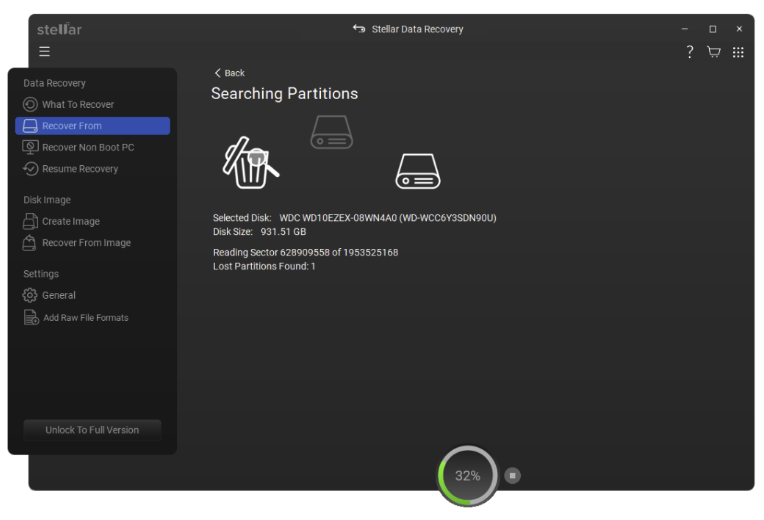
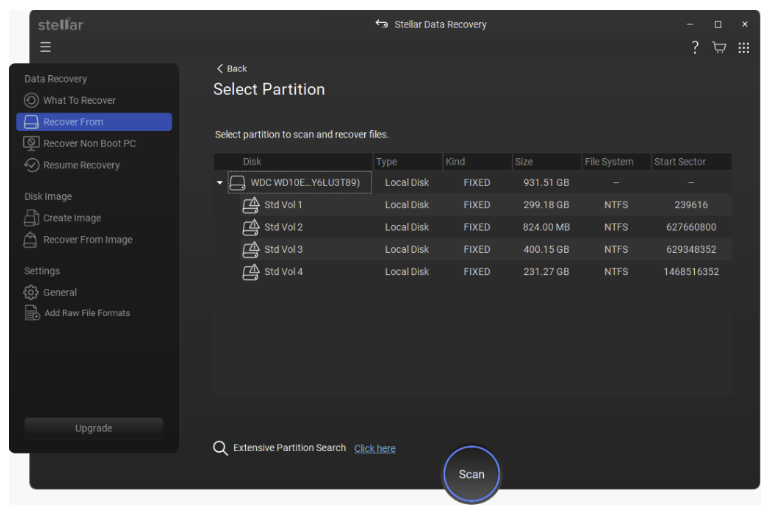
Step 5: After the partition scan completes, review the list of discovered partitions. Select the partition(s) you want to recover data from and click Scan.
Step 6: When the scan finishes, preview the recoverable files, select the items you wish to restore, and click Recover.
Step 7: Choose a destination to save the recovered data by clicking Browse. Always select a different drive or partition than the one you are recovering from.
Method 3: Go For A Professional Data Recovery Service
Sometimes, even the paid recovery tools don’t work because either the damage is beyond recovery or the user doesn’t know how to perform the recovery task properly. In any case, completely losing data or a partition is not a good option, and then you need professional help.
You can opt for a professional data recovery service when you have more complicated issues. Sometimes, it is tough to solve RAW drive problems or do drive reformatting. There could be several issues, like system boot errors, virtual disk corruption, etc., affecting your hard drive partition. Such issues are really hard to resolve using free tools or paid tools by non-technical persons.
In such cases, hiring a data recovery service is a smart hack. The professionals can easily recover partition in case of a system crash or Windows update.
Conclusion
While the problem of losing a partition in a system crash or during a Windows update is quite serious, the hacks for recovering it are limited. However, if you are sure that the partition is actually not lost and simply hiding because the drive letter is missing, a simple process is enough to restore the partition. In case of permanent loss, you have limited options like using a recovery tool or having a professional help from the software agency.